
The envelope method · Step 4
Manage your subscriptions
List every subscription, monthly and yearly, and see exactly what they cost you.
How many subscriptions are you paying for right now? Most people can't say. This step lists every one.
Give subscriptions their own group
Put them all in one group called Subscriptions, or split them in two: Monthly subscriptions and Yearly subscriptions. Two groups are easier to follow.
The monthly group is for things like a streaming service, a software subscription or a cloud storage plan. The yearly group is for the ones you pay once a year.
Be honest about each one
Is it a must pay? If you edit videos for a living and need your editing software for work, yes. A streaming service you rarely watch probably isn't.
Do it in Smarter Budget
For each subscription:
- Create an envelope and put it in its group.
- Under How much choice?, pick Must pay, Could reduce or Optional.
- Turn on Target and choose Bill or goal. (Monthly spending is for things like food.)
- Turn on Repeats, and set it to every 1 month or every 1 year.
- Enter the amount, and set Next payment due.
- Under Paid from, choose the account that pays it.
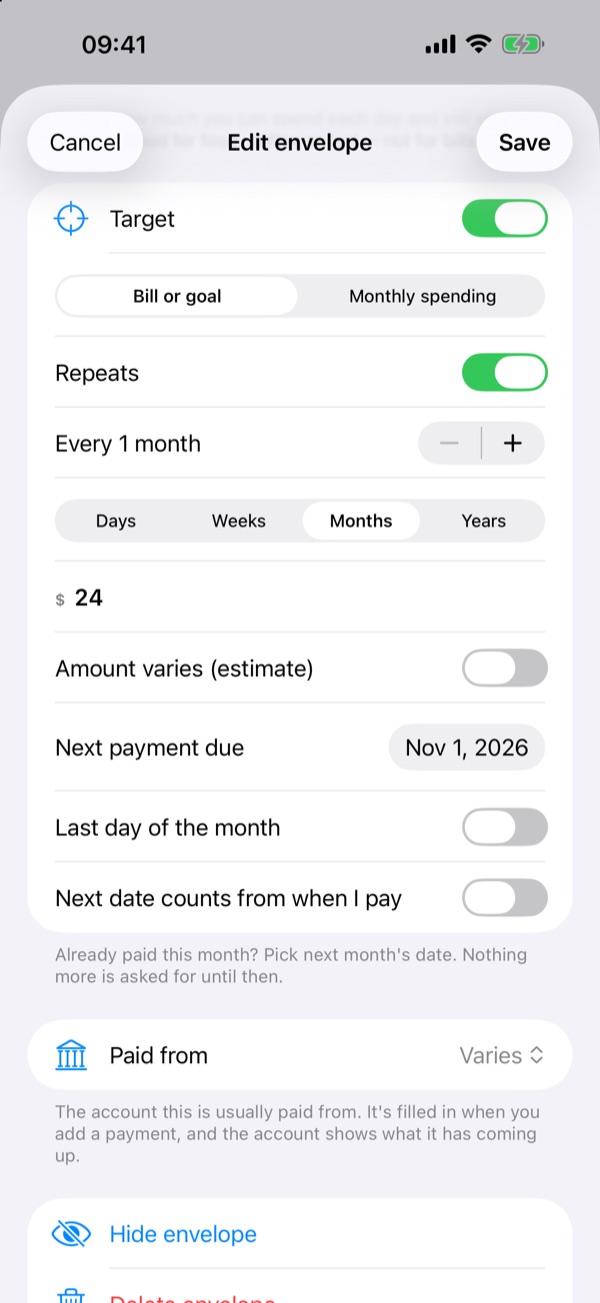
When you're done, all your subscriptions are in one place, and you can see what they cost you.
Free for two weeks, then a one-time purchase. No subscription.
General information only, not financial advice. Think about your own situation, and talk to a qualified professional before big financial decisions.